
Table of Contents
- 1. Types of Cloud Migration
- 2. Hybrid Cloud Migration
- 3. Cloud Migration Strategies: The 7Rs
- 4. Migration to Major Cloud Platforms
- 5.How to Choose the Right Cloud Migration Type
- 6. Cloud Migration Process
- 7. Benefits of Cloud Migration
- 8. Common Cloud Migration Challenges
- 8. Conclusion
- 9. Frequently Asked Questions
Every organization eventually reaches a point where its existing infrastructure can no longer keep up with growing data volumes, rising maintenance costs, and increasing demands for speed and flexibility. Cloud platforms such as AWS, Microsoft Azure, and Google Cloud provide scalable infrastructure, but migration is not as simple as flipping a switch.
Each workload behaves differently, and every organization operates under unique constraints. Understanding the different types of cloud migration is the first step toward a successful transition.
This guide explains the major migration types, the strategies used to execute them, and how to determine the right path for your environment.
Types of Cloud Migration
Data Center Migration
Data center migration moves an organization’s entire on-premises infrastructure, including servers, storage, and networking, into the cloud. It is typically pursued when hardware reaches end-of-life, leases expire, or organizations decide to eliminate physical infrastructure management.
The process includes virtualizing servers, replicating storage and backup systems, and redesigning network architecture for cloud deployment. Because systems are tightly interconnected, dependency mapping and phased execution are essential to prevent downtime or data loss.
Application Migration
Application migration focuses on moving individual software applications from on-premises servers or legacy environments to cloud infrastructure. Unlike full data center migrations, this can be scoped to a single app or a specific suite of applications, making it a more controlled and iterative process.
Application migrations vary widely in complexity, ranging from a simple lift-and-shift with minimal code changes to full re-architecture of monolithic applications into microservices. It is often the starting point for organizations new to cloud adoption, as it allows gradual experience without committing to a wholesale infrastructure overhaul.
Database Migration
Database migration involves moving relational and NoSQL databases from on-premises or self-managed environments to managed cloud database services. This transition reduces operational overhead related to patching, backups, high availability, and scaling while improving reliability and elasticity.
Successful migration requires validating schema compatibility, preserving data integrity, and optimizing query performance, particularly in heterogeneous scenarios such as Oracle to PostgreSQL. Careful planning is essential to minimize downtime during cutover, and automated replication tools are commonly used to streamline data transfer and synchronization across environments.
Cloud-to-Cloud Migration
Cloud-to-cloud migration involves moving workloads, data, or applications from one cloud provider to another, for example, from AWS to Azure or from GCP to AWS. Organizations pursue this migration for cost optimization, regulatory requirements, or strategic consolidation.
Despite surface-level similarities between providers, these migrations can be complex. Proprietary services such as AWS Aurora, Azure Cosmos DB, or BigQuery may lack direct equivalents on competing platforms, requiring workload adjustments.
Hybrid Cloud Migration
Hybrid cloud migration creates an architecture where certain workloads remain on-premises while others operate in public or private cloud environments. It is common in regulated industries where data residency, latency, or legacy system constraints prevent full cloud adoption. This model allows gradual modernization while maintaining control over critical systems.
Multi-Cloud Migration
Multi-cloud migration distributes workloads across two or more public cloud providers simultaneously. Organizations use this model to reduce vendor lock-in, improve resilience, leverage specialized services, or meet geographic compliance requirements. However, it increases governance complexity across identity, networking, cost management, and security controls.
Cloud Repatriation
Cloud repatriation, or reverse migration, involves moving workloads from public cloud back to on-premises or private infrastructure, typically due to cost predictability, performance control, or data sovereignty requirements. It reflects workload optimization rather than failure, placing systems where they perform most efficiently.
Cloud Migration Strategies: The 7Rs
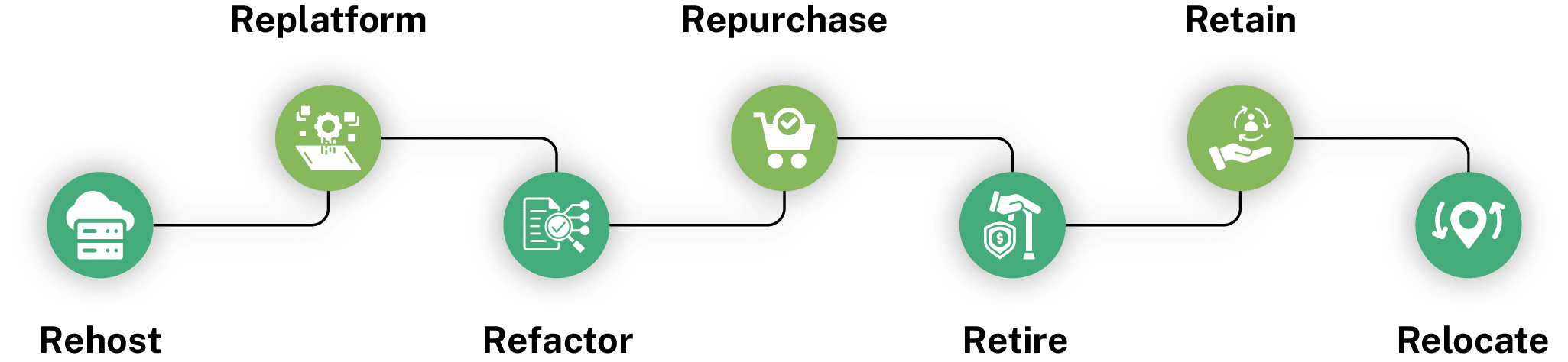
The 7R framework helps organizations determine the appropriate treatment for each workload during migration.
- Rehost: Migration of applications to the cloud without architectural changes, primarily for speed and minimal disruption.
- Replatform: Cloud replatforming adds limited optimizations, such as shifting to managed database services, without altering the core architecture.
- Refactor: Cloud refactoring redesigns applications to leverage cloud-native capabilities like microservices, containers, or serverless execution.
- Repurchase: Replaces legacy applications with SaaS platforms when functionality is not a core differentiator.
- Retire: Decommissions underutilized systems identified during portfolio assessment.
- Retain: Keeps certain workloads in their existing environment due to compliance, cost, or strategic considerations.
- Relocate: Transfers virtualized environments to cloud infrastructure without modifying the operating system or application layer.
Each strategy balances speed, cost, risk, and long-term cloud optimization. Selecting among the various types of cloud migration and applying the right strategy to each system being migrated directly impacts cost, performance, and long-term scalability.
Migration to Major Cloud Platforms
Migrating to AWS
Amazon Web Services supports e-commerce, media, and enterprise workloads across compute, storage, databases, and machine learning. Its global infrastructure meets latency and residency needs. Migration tools such as Application Migration Service, DMS, DataSync, and Migration Hub streamline discovery and workload transfer.
Migrating to Microsoft Azure
Microsoft Azure suits organizations running Windows Server, SQL Server, Active Directory, and Microsoft 365. Its hybrid capabilities through Azure Arc and ExpressRoute support blended environments. Migration tools, including Azure Migrate and Database Migration Service, assist with workload assessment and structured transitions.
Migrating to Google Cloud Platform
Google Cloud Platform is widely used for data analytics, machine learning, and AI-driven workloads. BigQuery and Vertex AI form a strong analytics foundation, while Google Kubernetes Engine supports containerized applications. Migration tools include Migrate to Virtual Machines and Database Migration Service.
How to Choose the Right Cloud Migration Type
Choosing between different types of cloud migration requires evaluating infrastructure scope, application complexity, compliance needs, and budget constraints
Application Complexity
Stateless or modular applications can typically be rehosted or lightly replatformed with limited architectural change. Legacy systems with deep integrations, undocumented logic, or proprietary middleware require thorough assessment before migration. Gradual refactoring often ensures stability, scalability, and sustainable cloud performance.
Compliance Requirements
Data residency mandates, encryption policies, and audit logging requirements directly influence migration architecture decisions. Organizations subject to HIPAA, PCI DSS, or SOC 2 must confirm provider compliance capabilities before transitioning workloads. Hybrid or region-specific deployments are often necessary.
Budget and Timeline
Lift-and-shift strategies reduce immediate engineering effort and accelerate transition timelines. Without optimization, however, they may not align with long-term cloud cost efficiency models. Modernization requires higher upfront investment but typically delivers improved scalability, resilience, and sustained operational savings.
Cloud Migration Process
A successful cloud migration follows a structured process that minimizes risk, maintains business continuity, and sets the foundation for ongoing cloud optimization.
- Step 1 – Assessment: Identify all applications, infrastructure components, and interdependencies to determine migration scope, prioritize workloads, and evaluate associated risks before execution.
- Step 2 – Architecture Design: Design the target cloud environment, including networking, identity management, security baselines, and workload placement, before moving any systems.
- Step 3 – Pilot Migration: Migrate a low-risk workload first to validate tooling, governance controls, and operational readiness before broader rollout.
- Step 4 – Phased Rollout: Execute migrations in structured waves, progressing from simpler systems to critical workloads with defined rollback plans.
- Step 5 – Optimization: Continuously rightsize resources, enforce governance policies, and monitor cost and performance after migration completion.
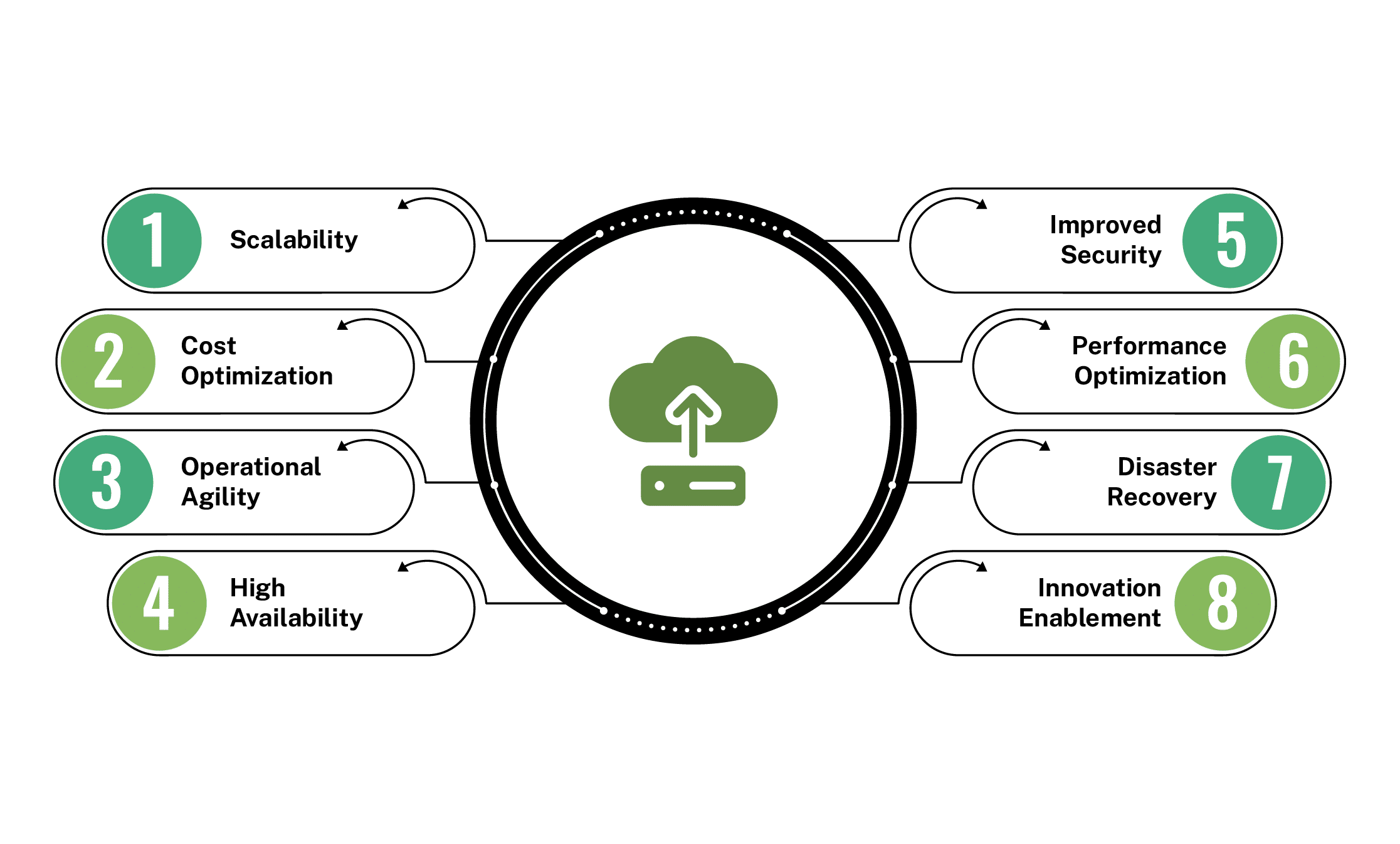
Benefits of Cloud Migration
Common Cloud Migration Challenges
Even well-planned migrations encounter obstacles. Here are the most common challenges to prepare for:
- Downtime Risks: Poorly planned migrations can disrupt critical systems and impact business continuity. Structured cutover strategies must be defined before execution.
- Security and Compliance: Misconfigurations and inconsistent identity policies are leading causes of cloud risk. Governance must be enforced from day one.
- Cost Overruns: Unoptimized workloads and uncontrolled resource provisioning frequently inflate cloud expenses. Continuous cost monitoring is essential to maintain financial discipline.
- Operational Complexity: Cloud environments introduce new operational models and technical skill requirements. Standardized processes and automation must support long-term stability.
Conclusion
Cloud migration is not a one-time project. It continues as your organization grows and systems evolve. The right migration type, strategy, and platform depend on your current infrastructure, regulatory requirements, and long-term objectives. Success comes from clear assessment, practical planning, and phased execution. When handled properly, cloud migration improves scalability, cost control, and operational stability.
Frequently Asked Questions
What should an enterprise cloud migration plan include?
An enterprise cloud migration plan should define workload prioritization, compliance requirements, risk mitigation, phased timelines, cost governance, and incorporate application modernization in the cloud, where legacy systems require refactoring or replatforming.
What are the 4 types of cloud models?
The four primary cloud service models are Infrastructure as a Service (IaaS), Platform as a Service (PaaS), Software as a Service (SaaS), and Function as a Service (FaaS).
Can organizations use multiple types of cloud migration at once?
Organizations often combine different types of cloud migration within a single transformation program, migrating applications, databases, and infrastructure in phased or parallel approaches.
What are the 5 types of clouds in cloud computing?
Public, Private, Hybrid, Community, and Multi-Cloud. Each offers different control, security, cost, and scalability options, enabling businesses to choose deployment based on their specific needs.
IaaS vs PaaS: Which is better?
IaaS provides virtualized infrastructure, giving flexibility and control. PaaS offers ready-to-use platforms for faster development. Choice depends on technical expertise, customization needs, and speed-to-market priorities for projects.